 InkLora
Import a Lorcana deck from a picture
Found a deck image you like? No need to type it in card by card. Give InkLora a picture of the whole deck: it reads every card and its number of copies into a list you can edit, then builds the deck with one click.
Which images work
- Deck images with the cards in a grid and the number of copies at each card’s top right
- Dreamborn deck images (hexagon count badges)
- Tournament and community deck posters (square count badges)
- Deck images made with InkLora’s Share
- Long phone screenshots, and last rows that aren’t full
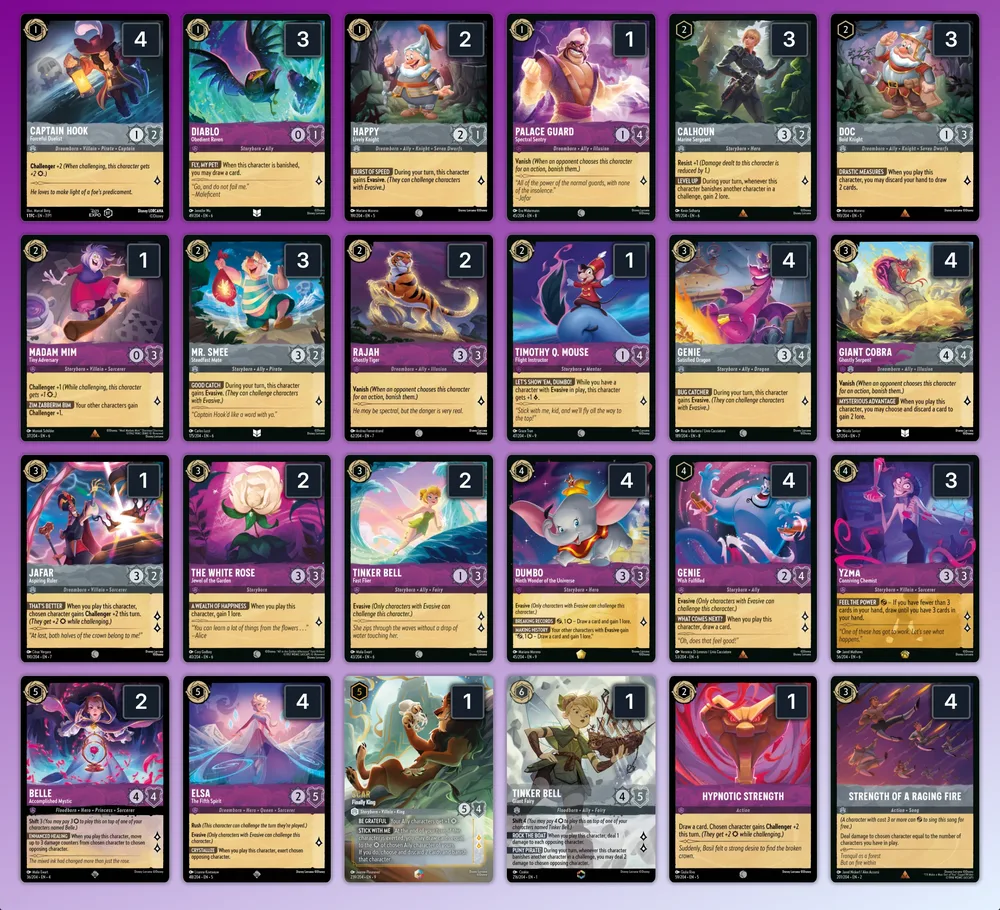
Three steps
- Open the Deck Builder and press “Import image”.
- Choose a picture, or paste one (Cmd/Ctrl + V). You can also try the sample first.
- Check the list on the right (uncertain cards are marked in yellow), edit it if needed, then press “Import as new deck”.
FAQ
Is my image uploaded?
No. The image is read in your browser and never leaves your device.
Which sets are supported?
Every set, 1–14: 3058 cards. A deck with cards from rotated sets is set to the Infinity format automatically.
What if a count can’t be read?
The card is counted as 1 and marked in yellow; change the number in the list before importing.
What about regular and Enchanted copies of the same card?
They are added up as copies of the same card.
Do I need an account or to pay?
No. It is free and needs no sign-up.
Want to share a deck with friends? Share a deck ›